Saturday, September 17, 2011

feature-phones, smart-phones and super-phones.

My experiment with this phone has lead me to the following conclusion:

There are three types of phones.  1) Feature phones 2) Smart-phones and 3) Super-phones.

Feature phones are the phones we all used back in the 90's.    They can make calls and text, maybe they have a camera, but they do not run apps.

Smart-phones are the iPhone and blackberry.   They have and run apps (good ones!) but can't do "everything"

Super phones are any top tier android device.   They can do anything.

What type of phone is right for you?  There is no correct answer.  

What should happen is that users 'move up' the ladder.  If you think your iPhone 'can do anything,' try and android phone.

If you love your feature phone, try a iphone or a blackberry.

NERD!

I was just browsing around the internet and stumbled upon this and got really excited.

Games coming to Android

My first thought was "OOO, i wonder if they will be available for my phone"

My second thought was "iPhone users never have to ask that question"

My third thought was " O yea, if I buy a Nexus Phone I never have to ask that either"

One of the GREAT things about Android is choice.    You can choose a phone of any price, features and size that you want.   However with that choice can come problems with fragmentation, apps and updates.

Always having a Nexus series phone solves all those problems, but then we lose our ability to choose.   Sounds familiar.......

Friday, September 16, 2011

Positive post!

  After ripping the iPhone a new one in the last post, I feel the need to praise it.

  The trouble is, I've run out of good this to say, so I'll repeat some old ones.

-iPhone animations put android to shame.   It makes android look likes its in beta testing.

-The high resolution screen makes me think i need glasses on my wifes phone.

-10 reasons i love my iphone 4  i didn't write this, it actually makes me giggle a little bit.  Android users know why.

Multippppplicity

  I swore at this phone this morning.   In my car, alone, I actually looked my phone straight in the front facing camera said "what the f***.   I will separate this post into two sections - pro-iPhone and anti-iPhone

The topic of this post is the method used for "settings" of apps.   Since the iPhone doesn't have an "options" button near the "home" button, developers get to chose where to put their app "settings"
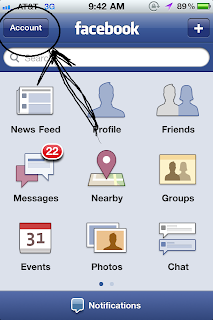

Lets take the Facebook app for example.   The facebook app has a "settings" button within the app, on the app's home screen in the upper left hand corner.  See picture below.  Note its called "account" but there are settings within it.


To get to the next location for settings, you press "home - settings - facebook" See picture to the right.


Another one!  "home -settings - notifications" 


LAST ONE!  "home - settings - location services"

The question i'm asking, is WHY ARE THERE 4 DIFFERENT LOCATIONS FOR SETTINGS?

PRO-IPHONE
  Apple has given developers the option of putting their app settings within the "general settings" of the iPhone.  This really is awsome (really!), however apps should not have the option to put their settings within the app.  Apple should either force all settings of all apps be within the app, or within general settings.  Allowing both just makes for a confusing SEARCH for where the apps settings are.
  Apple has also allowed a single place for ALL apps asking for your location, and ALL most apps giving you notifications.   From this single place you can toggle multiple different apps' notification, without having to switch from app to app.   This will simply boil down to user preference.

ANTI-IPHONE (the way android does it)
  Why the heck are there 4 different locations for a user to toggle settings?  This makes absolutely no sense.  Android an "options" button, located within the app, all the settings you can change are located there.  Having 4 locations for settings is against what apple stands for, simplicity.


More frustration examples:

-The pulse app has a settings button within the app but no settings within the app, all settings are in the phones general settings.   The settings button within the app allows you only to add news feeds.   It took me 16 days to find the actual app settings.
-Skype has no settings button in the app, they are all within the phone general settings
-Fox news only has settings within the app
-To make it more confusing, Skype has a "notifications" settings within "home - general settings - skype -notifications" but not "home - general settings - notifications".   If you think this is confusing, it is.

The only way to summarize this is absolutely F****ed.  If you are an iPhone user this is not normal and we can get you help.

*Note: The facebook app for the iPhone has more settings that the one for Android, this based on the app developer, not the iOS software.  If facebook put more effort into their android app they would be the same and on android they would all be located within the app.


Simply simple - PART 1

One thing some people may like about the iPhone is the lack of options, settings, widgets and home screens.   I am not that person.

  However I can image the type of person it is, and I can imagine it being nice not to have to think about customizing my phone.   This type of person just wants a phone with a couple extra bells and whistles.

The simplicity of the layout of the iPhone is a very positive thing for this person.  There is nothing wrong with this.

The main thing that makes this phone simple is the lack of home-screens and widgets.   When the "home" button is pressed, the home screen always looks the same.   The app drawer looks the same as the home screen.   All screens are clean and easy to find what you want.

Android has what they call "widgets"  Widgets are interactive areas of your screen that automatically update, or do something they are programmed to do.   They are easy to setup, but can be complicated for some people to decide what you want to fit on your screen.   However a buyer should note the benefits of the screen to the right.    Note that the layout is nowhere near as pretty and polished as the iOS homescreen, but it is 100x more USEFUL.

Say you unlock your iPhone and want to check the weather, your calendar and play your music.   The button sequence is "unlock - weather app - home button - calendar - home button - ipod app - play"

With your android widgets the button sequence is "unlock - play"  Meanwhile you have viewed the weather and your calendar because they are on your home screen.   Isn't that simple?

Phones can have 5 or more homescreens, all with their custom widgets that can do anything you can imagine!  So many choices can be complicated for some people, and it is no-where near as clean as the iOS homescreen.

Each device is fully customizable and it is fun to see other peoples home screens, what widgets they are using and how they have them organized.  This is why it is FUN to see other peoples phones.

Note: I am not saying the iPhone is simple, i'm saying the layout of the device and settings are simple.  I actually find the iPhone very complicated to use. *more on this later

Thursday, September 15, 2011

Fingerprints

I haven't actually experienced this because I left my plastic screen protectors on, but Apple has some coating on the glass screen that reduces fingerprints.  What a great idea!   Finger prints on glass are just nasty.

fingerprints

One commenter says that his coating wore off over a period of time.

The competition over at Samsung or HTC have never even tried.   Regardless, I always installs screen protectors on the phones I plan on keeping.   They dont really get in the way, and they are much better at resisting fingerprints than any glass coating.   They do feel plasticy though..

You will get micro scratches even if you are very careful with a phone and have no protector on it.  Ask me, I know, it just happens.

iPhone keyboard

I'm not sure how Apple has done it, but the touch screen keyboard on the iPhone is outstanding, but only in its ability to detect which key was pressed (or should have been pressed).  I feel like I can "hunt and peck" as fast as my fingers can move and it detects every letter correctly.   For whatever reason, the android keyboard requires just a tiny tiny tiny bit more effort.  This is where ease of use ends on the iPhone keyboard though.

UDPATE:  I just picked up the good ol' Nexus One, and had just as much trouble hunting and pecking as the iphone.  My statement has been retracted.

Because of the screen size, they keyboard layout is often awkward to me.   Why do I have to press the "alt" button to get to a period in the "messaging" keyboard..   Aren't period's commonly used, why are they on a separate tab?

Other awkward items to me.    The letters on the keys look the same no matter what "shift" mode your in.   The "A" letter always has "A" on it whether or not caps lock is on.   Android letters change from "a" to "A".

Android keyboards allow you to long press a letter to key a symbol behind it.   You can long press "R" and it will pop up a "4".

Typical on screen keyboards are the equivalent to hunt and peck while typing.  This goes for Android or iOS.   A software developer for Android has taken it to the next level and created a keyboard that allows you to drag your finger from one letter to the next.

When you use a swipe keyboard, you never take your finger off the keyboard, you drag it from letter to letter, and you really don't even have to be close.    Swipe can be done with your eyes closed as long as you can picture a keyboard in your head (good for txt while driving).

When most people see Swype, without having used it, they say "GASP! that is so difficult I could never use it."  I said that for almost a year before I forced myself to start.   Anybody that has used it will never give it up.  You couldn't pry Swype from my cold dead hands.  It is easy to use and much faster than "hunt and peck"

If traditional keyboards are "hunt and peck" then swipe is equivalent to "two hands no eyes and 60 words per minute"

Since Apple does not allow users to replace system apps with their own, iPhone users dont get the CHOICE.  A quick search revealed that users can download more than 12 different keyboards.  They download and install like any app.

swype demo

swype vs iphone  Note*  Both users in this video apear to be "average"  Neither one is going as fast as possible.

One last thing.   Whey type when you can just talk?   the iPhone lacks IN-APP voice to text transcription.

voice to text  Skip to 2:45 to see it in action.